

Secondary Sales
How to reconcile distributor sell-out data when codes, names and periods don't match
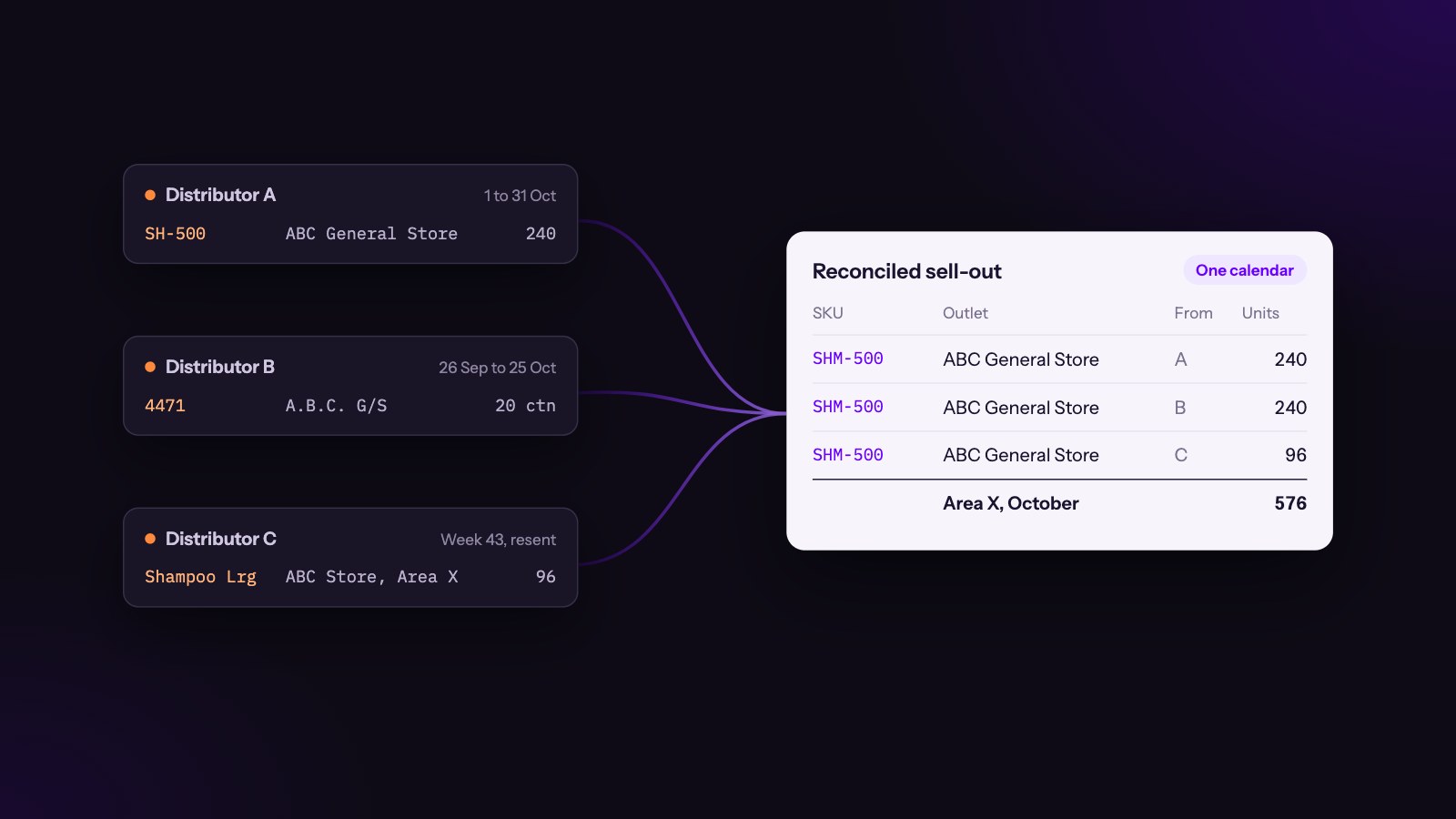
If you sell through distributors, you already know the feeling. The month closes, the files arrive, and none of them agree with each other. One distributor calls your 500 ml pack SH-500, another calls it 4471, and a third sends it as "Shampoo Lrg". The same shop in Area X appears as "ABC General Store", "A.B.C. G/S" and "ABC Store, Area X". One file covers the 1st to the 31st, another closes on the 25th, and a third arrives weekly and gets resent with corrections two weeks later. By the time you reconcile distributor sell-out data, you've spent more time figuring out what actually sold than deciding what to do about it.
Then someone in the head office has to put it all together in a spreadsheet before the review meeting, and the numbers change every time they do.
The fix isn't a better spreadsheet. It's a small, repeatable reconciliation process that keeps the raw data, maps it to your own master data once, and sends anything it can't match to a person instead of guessing. Below is the method we recommend, step by step.
Why sell-out data never matches
It helps to name the three problems separately, because each one needs a different fix.
- Product codes differ. Distributors use their own item codes, their own descriptions and sometimes their own pack units. Free goods and promotional packs often get codes of their own. When you launch a new pack or retire an old one, each distributor updates their system on a different day.
- Customer names differ. Retailers are typed in by hand, by different people, over years. Spellings, abbreviations, area names and even the shop's owner's name end up in the "customer" field. Two distributors serving the same shop will never spell it the same way.
- Reporting periods differ. Calendar months, distributor months that close on the 25th, weekly files, cumulative month-to-date files, and late corrections all describe overlapping slices of time.
If you mix these problems together, you end up with a single "cleanup" step that nobody can explain or repeat. Keep them apart.
Step 1: Keep the raw files exactly as they arrived
Before you change anything, store every file as it was received, with the distributor, the date it arrived and the period it claims to cover.
This sounds like admin, but it's the foundation of everything else. When a regional manager asks why March changed after the meeting, you need to point at the corrected file that arrived on 9 April, not say "we reran the sheet". Raw files also let you re-process history when you improve a mapping, without asking distributors to send everything again.
Rule: never edit a distributor's file. Transform a copy, and keep a link from every clean row back to the raw row it came from.
Step 2: Map product codes to your own product master
You need one product master: your own list of SKUs, with a code, a description, a pack size and a base unit (for example single units, kilograms or litres). Every distributor code gets mapped to one of your SKUs, once, in a mapping table.
| Distributor | Distributor code | Distributor description | Your SKU | Units per distributor unit | Valid from |
|---|---|---|---|---|---|
| Distributor A | SH-500 | Shampoo 500ml | SHM-500 | 1 | 2025-01-01 |
| Distributor B | 4471 | SHMP LRG 12X | SHM-500 | 12 | 2025-01-01 |
| Distributor C | Shampoo Lrg | Shampoo Lrg | SHM-500 | 1 | 2025-03-15 |
A few details make this work in practice:
- Convert everything to base units. Distributor B sells by the carton of 12. If you don't convert, their volume looks twelve times smaller than it is.
- Give each mapping a start date. Codes get reused. A code that meant your old 400 ml pack last year may mean the new 450 ml pack now. Dates keep history correct.
- Treat free goods separately. Bonus units should count toward volume, but not toward value. Give them their own flag rather than a separate SKU in your reports.
- Handle replaced products on purpose. When a pack is discontinued and replaced, decide whether reports should show them separately or roll the old one into the new one, and record that decision in the master data.
- Send unknown codes to a queue. A code you've never seen should never be dropped or guessed. It goes to a review list with its volume, so someone can map it in a minute and the numbers update.
Once a code is mapped, it stays mapped. After the first two or three months, most distributors produce almost no new codes, and this step becomes a few minutes of work each month.
Step 3: Match customer names to real outlets
Customer matching is the hardest of the three, because names are written by people. The goal is the same as with products: match each distributor's customer to one outlet in your own outlet master, once, and remember the answer.
Clean the names before you compare them
Normalise both sides the same way before matching:
- convert to one case and remove punctuation (
A.B.C. G/Sbecomesabc g s); - expand common abbreviations (
g sandgen storebecomegeneral store,medbecomesmedical,& cobecomesand company); - remove words that don't identify the shop, such as the city name when every row is in the same city;
- keep the area, street and phone number in separate fields, because they're often the best evidence.
Use more than the name
Two shops called "XYZ Store" in the same city are common. Match on a combination of evidence:
| Evidence | Why it helps |
|---|---|
| Name similarity | Catches spelling differences and abbreviations |
| Area or town | Rules out shops with the same name elsewhere |
| Phone number | Very strong when present; one shop rarely shares a number |
| Street or landmark | Separates shops in the same area |
| GPS location from a field visit | The strongest evidence of all, when your reps have visited the outlet |
| Distributor's own customer ID | Lets you remember a confirmed match for next month |
Accept, review or create
Score each candidate match and act on the score:
- High confidence: accept automatically, but keep the score so you can audit it.
- Middle: send to a person to confirm with one click. Show the evidence side by side.
- Low, or no candidate: treat it as a possible new outlet. Someone confirms it exists, ideally with a field visit, before it's added to the master.
The most important part is the last column of the evidence table. Once a person confirms that Distributor B's customer C-10233 is your outlet OUT-04512, store that link. Next month the same customer ID matches instantly, whatever the name says. Over time the review queue shrinks to genuinely new shops.
Step 4: Put every row on one calendar
Decide on one reporting calendar for the business, for example calendar months, and convert everything to it.
- Store the transaction date when you have it. If the distributor sends invoice-level or daily data, keep the real date and let your calendar decide which period it belongs to. Distributor month-ends then stop mattering.
- When you only get period totals, record the period exactly. A file covering 26 February to 25 March should say so. If you must report it as March, write down the rule you used, and apply the same rule every month.
- Know whether a file is incremental or cumulative. Month-to-date files repeat earlier days. Loading them as if they were new sales double-counts everything. Replace the earlier version instead of adding to it.
- Expect corrections. Late returns and corrected invoices arrive after the month closes. Load them as a new version of that distributor's period, keep the old version, and show which version a report used.
- Close periods deliberately. Pick a date after which a month is closed for reporting, and let later corrections flow into an adjustment line rather than silently changing the figures people have already discussed.
Step 5: Check the totals before anyone sees them
Mapping and matching make the data consistent. Control checks make it believable. Run these for every distributor and every period before the numbers reach a dashboard:
- File totals. The sum of the clean rows should equal the totals in the raw file. If they don't, a row was lost in mapping.
- Stock flow. Opening stock plus what you shipped to the distributor (sell-in) minus what they sold (sell-out) and minus returns should come close to their closing stock. A distributor reporting more sell-out than they could have had in stock is a data problem, not a great month.
- Sell-out against sell-in over time. Over a few months, sell-out and sell-in should move together. A sudden gap points to missing files, a code that stopped mapping, or stock building up in the channel.
- Coverage. Compare this period's active outlets with last period's. A drop of 30% usually means a missing file or a changed customer ID, not 30% of shops closing.
- Unmatched share. Track how much volume is still unmapped or unmatched. Report it next to the numbers, so readers know how complete they are.
When a check fails, the period for that distributor is flagged, not hidden. People can still see the numbers, with a clear note that they're under review.
Step 6: Give exceptions an owner
Every reconciliation process produces exceptions: unknown codes, uncertain matches, failed checks, late files. The process only works if each type has an owner and a deadline.
| Exception | Usually owned by | Typical deadline |
|---|---|---|
| Unknown product code | Sales operations or the master data owner | Before the period closes |
| Uncertain customer match | Area manager or sales operations | Within the week |
| Possible new outlet | Field team, confirmed by a visit | Next visit cycle |
| Failed control check | Distributor manager, with the distributor | Before the review meeting |
| Missing or late file | Distributor manager | Agreed date in the distributor contract |
Keep this inside your own organisation. Your team knows your products, your outlets and your distributors better than any outside party, and the decisions they make, such as which pack replaced which, are business decisions.
Step 7: Measure data quality, not just sales
If you measure each distributor's data quality, it improves. A simple monthly scorecard is enough:
- On time: did the file arrive by the agreed date?
- Mapped: what share of volume mapped to known products without manual work?
- Matched: what share of volume matched to known outlets?
- Complete: did the file pass the totals and stock-flow checks?
- Stable: how often did the distributor resend or correct a closed period?
Share it with distributors. Most data problems come from habits on their side, like free-typed customer names or reused codes, and a scorecard turns a vague complaint into a specific request.
Common mistakes to avoid
- Cleaning data inside the report. Lookups and manual fixes in the reporting sheet can't be repeated or audited. Fix data once, upstream, and let every report read the same clean result.
- Guessing matches to get to 100%. A wrong match is worse than no match, because it moves sales to the wrong outlet and the wrong rep. Leave doubtful rows unmatched and visible.
- Overwriting history. If a mapping changes, apply it with a start date. Rewriting last year's numbers without telling anyone destroys trust in every report.
- Ignoring units. Cartons, packs and single units mixed in one column is the most common cause of numbers that are "almost right".
- Treating the process as a project. Reconciliation is a monthly routine. Plan for it the way you plan the sales review itself.
How Dexor handles this
Dexor was built for companies that sell through distributors, so much of this process lives in the product rather than in a spreadsheet next to it.
- Files: distributors can send their files by email, and each file is kept as a batch you can trace rows back to.
- Outlets: each distributor's customers are mapped to your own outlets. When Dexor isn't sure which outlet a name belongs to, the line goes to a match queue. There your team approves one of the suggested outlets, chooses another, or leaves it unmatched on purpose.
- Learning: every approved match is remembered, so the same customer is placed automatically in the next file.
- Data quality: a data quality view shows which rows were rejected and why, and which outlet names look like duplicates, so problems are fixed at the source.
The result is one set of secondary sales numbers that sales, finance and distributors can agree on, with a trail from the figures back to the files they came from.
Frequently asked questions
What is sell-out data?
Sell-out data is what your distributors sold to retailers or end customers, as opposed to sell-in, which is what you sold to the distributors. It's also called secondary sales. It tells you what is actually moving in the market.
How long does it take to set up product and customer mapping?
The first month is the heaviest, because every code and customer is new. After two or three months most distributors produce very few new codes or customers, and the monthly work drops to reviewing a short exception list.
Should we match customers automatically or by hand?
Both. Accept high-confidence matches automatically, send uncertain ones to a person, and remember every confirmed match so the same customer never needs reviewing again.
What if a distributor's month ends on a different date?
Ask for transaction dates if you can, and assign each row to your own calendar. If you only get period totals, record the exact period covered and apply one written rule for assigning it to your months.
How do we handle corrections after a month is closed?
Load the correction as a new version of that distributor's period and keep the old one. After your close date, show late changes as an adjustment rather than silently changing numbers people have already reviewed.